Pages

Showing posts with label servlet-api. Show all posts

Saturday, September 6, 2014

Atlassian Lego Jira plugin development: simple multi-functional plugin with services (Lego,RaspberryPi, Netty)

   Not so long time ago I've been doing  small presentation about how to create various plugins into  the Alassian ecosystem, mainly Jira and Confluence. I want to share some step how to deal with plugin that aggregates more functionalities (CRUD Servlet with Services, Project Template and REST api). 
One of the issue here is the version of the Atlassian libraries you will use for your development. Reason is obvious, compatibility and another repositories. So let's take a look on maven descriptor file pom.xml. 
...

    
      jfrog
      http://repo.jfrog.org/artifactory/libs-releases
    
    
      atlassian-public
      https://maven.atlassian.com/repository/public
      
        true
        never
        warn
      
      
        true
        warn


...

    5.0.4
    6.1.7
    2.5.0
    3.0.0-m24
    2.7.1
    2.18
    

    4.3.5
    2.1

    
    1.0-SNAPSHOT
    
    4.11
    1.8.5

...
  The nice thing on the plugin development is testing of all parts during the process. Atlassian provides some testing libraries (ex. jira-tests or jira-func-tests) in additions with others (harmcrest matcher, mockito, junit etc...) 
Img.1.: heart of the plugin -> descriptor file -> atlasssian-plugin.xml
The most important of the plugins is the heart (Img.1.) represented by descriptor file. 

  
    ${project.description}
    ${project.version}
    
    images/pluginIcon.png
    images/pluginLogo.png


    The LEGO CRUD Issue Plugin
    /issuecrud


    Lego CRUD Resources
    com.atlassian.auiplugin:ajs
    com.atlassian.auiplugin:jquery


    atl.general


    com.example.plugins.tutorial.servlet.LegoBrickService


    Provides Lego Brick services.


It shows which technologies (Soy ~ Google Closure, Blue-prints, Velocity ...) we use inside the plugin and which parts of jira core services we employ to make the plugin work according what we are expecting from it:
Img.2. - add1.: Lego Project Template is INSIDE like Intel
1. Lego project template (Img.2., Img.3.)
2. Lego Issue tracker 
3. Lego REST API 
Img.3. - add1.: Lego Template is there with Customised workflows and Issues
Add1.:: From the descriptor file we can read that for the template we do use Soy file. Closures allows us to dynamically generates the web page content
{namespace JIRA.Templates.ProjectLegoTemplates.Lego}
...
{template .renderLegoProjectTemplateExplanation}
    {getText('lego.project.template.info.page.description')}


    ...
    
  • {getText('lego.project.template.reason.1')}
  • {getText('lego.project.template.reason.2')}
  • {getText('lego.project.template.reason.3')}
... {/template} ...
and together with all messages having stored in property files makes internationalisation process latter much more easier. The whole project workflow together with issues is defined by *.json file
{
    "issue-type-scheme":
    {
        "name": "lego.project.template.issuetype.scheme.name",
        "description": "lego.project.template.issuetype.scheme.description",
        "issue-types": [
            {
                "key": "issueType1",
                "name": "New Lego Feature",
                "description": "A new Lego JSON feature of the product, which has yet to be developed.",
                "icon": "/images/icons/newfeature.png",
                "workflow": "wf1"
            },
            ...

    },
    "workflow-scheme":
    {
        "name": "lego.project.template.workflow.scheme.name",
        "description": "lego.project.template.workflow.scheme.description",
        "default-workflow": "wf1",
        "workflows": [
            {
                "key": "wf1",
                "name": "lego.project.template.workflow.wf1.name",
                "workflow-bundle": "/wfb/Issue-Tracking-Workflow.jwb"
            },
            ...
...
and the project is hooked with the JIRA system by using Blueprints API. Specifically implementing the interface AddProjectHook with @Overriden methods validate and configure .  
...
public class LegoProjectHook implements AddProjectHook {
    ...
    @Override
    public ValidateResponse validate(final ValidateData validateData) {
       ...
    }

    @Override
    public ConfigureResponse configure(final ConfigureData configureData) {
       ...
    }
...

  The result looks pretty cool because now we have inside the JIRA official Lego Project with its own issues and flows how to solve them. We can also track whole development. 
Img.4.: Lego Project inside the JIRA 
Add2.:: Lego issue tracker. 
   For those who has experiences with Lego MindStorm EV3 Java/Scala development it's nothing new to get an issue. The tracker is represented by the simple servlet that handles 
Img.5.:: Lego Issue Tracker
GET and POST request and allows to share the issue with others (Img.5). 
Img.6.: Velocity templates for LegoIssueTracker
   For generating the Lego issue tracker front-end (Img.6.) we use Velocity server-side template language. 
In side every template file (edit.vm, list.vm or new.vm) is possible to employ JavaScript to make for example cross-domain JSONP calls and get information from another resources (in my case RaspberryPi powered by Netty)
example: new.vm or edit.vm
...
function getRaspData(){
  jQuery.ajax({
    url: 'IP_ADDRESS',
    dataType: 'JSONP',
    jsonpCallback: 'callback',
    type: 'GET',
    success: function (data) {
      ...
      jQuery('input[name="ip"]').val(data.ip);
    }
  });
}
...
AJS.$(document).ready(function() {
   jQuery('.button-rasp').click(function() {
      console.log('RASP PI');
      ...
      getRaspData();
   });
});
...
...
...edit.vm - Velocity template language ...
...
<h1> Edit Lego issue $issue.getKey()</h1> #if ($errors.size()>0) ...
Now we are ready, according to the atlassian descriptor file, to create the Servlet implementaiton:
public class IssueCRUD extends HttpServlet {
    ...
    private static final String PLUGIN_STORAGE_KEY = "com.example.plugins.tutorial.servlet.lego";
    private static final String NO_IP_MESSAGE = "No IP Setup";
    ...
    private IssueService issueService;
    private ProjectService projectService;
    private SearchService searchService;
    private UserManager userManager;
    private TemplateRenderer renderer;
    private LegoBrickService legoBrickService;
    private static final String LIST_BROWSER_TEMPLATE = "/templates/list.vm";
    private static final String NEW_BROWSER_TEMPLATE = "/templates/new.vm";
    ...
    @Override
    protected void doGet(HttpServletRequest req, HttpServletResponse resp) throws ServletException, IOException { ...
    }
    ...
    @Override
    protected void doPost(HttpServletRequest req, HttpServletResponse resp) throws ServletException, IOException {
        ...
        User user = getCurrentUser(req);
        ...
     }
 ... 
After short coding session we have prepared also LegoIssue sending functionality 
Img.7.:: send the 1st Lego Issue to the LEGO project
The REST API in JIRA is power by JAX-RS - Jersey. It's easy to expose. Let's move back to the Atlassian descriptor file and define the access path. The whole work is then strait forward in our example:Add3.:: Lego REST api 
@Path("/")
@Consumes({MediaType.APPLICATION_XML, MediaType.APPLICATION_JSON})
@Produces({MediaType.APPLICATION_XML, MediaType.APPLICATION_JSON})
public class RestLegoService {
…
   public RestLegoService(PluginSettingsFactory pluginSettingsFactory) {
        this.pluginSettingsFactory = pluginSettingsFactory;
    }
   @GET
   @Path("brick")
   public Response getLegoBrick() { 
   …
In the end we get appropriate JSON response by accessing the defined path. 

I hope this blog post helps in way to get a basic idea how to deal with Atlassian plugin development. In my case I don't want to use it as the reminder what I have done :)
Enjoy!
PS: I've used IntelliJ IDEA 13.x and SourceTree    
  

Tuesday, August 19, 2014

Spring 4 Scala MVC without Web.XML - Tiles3 : WebConfig class configuration with Localisation


Img.1.:: Spring 4 Scala project structure with Tiles 3 and l18n(l10n) 
  Enabling Apache Tiles3 needs little more changes in the project (Img.1.) configuration. The WebConfig scala class needs to extended by WebMvcConfigurerAdapter (already touched in the previous post: Scala Spring 4 MVC without Web.XML configuration with static resources handling). 
  We also define the set of annotations we do need to be scanned over the project package. The reason of such definition is to show possibilities of Scala configuration of the Spring Framework itself.
@Configuration
@ComponentScan(basePackages = Array("miko.scala.helloexample"), useDefaultFilters = false, includeFilters = Array(
  new ComponentScan.Filter(`type` = FilterType.ANNOTATION,
    value = Array(classOf[Controller], classOf[Service]))))
@EnableWebMvc
class WebConfig extends WebMvcConfigurerAdapter{
...
  In WebConfig we do replace @Bean setupViewResolver(), which implements the ViewResolver interface that allows directly resolved symbolic view names,  by getTilesConfigurer @Bean, which provide TilesConfigurer. 
  The TilesConfigurer class provide the tempting mechanism for web project (application) using JSP and other front-end engines. 
@Bean
def getTilesConfigurer: TilesConfigurer = {
  val configurer:TilesConfigurer = new TilesConfigurer()
  configurer.setCheckRefresh(true)
  configurer.setDefinitions({"/WEB-INF/pages/tiles.xml"})
  configurer
}
 And additionally we have  to define ViewResolver for Tiles by getTilesViewResolver @Bean definition
@Bean
def getTilesViewResolver: ViewResolver = {
  val resolver:TilesViewResolver = new TilesViewResolver()
  resolver.setContentType("text/html")
  resolver
}
The full configuration needs to define and override also couple of other Beans connected with our localisation (l10n/l18n) intent. The final WebConfig Scala class will look in following manner. 
@Configuration
@ComponentScan(basePackages = Array("miko.scala.helloexample"), useDefaultFilters = false, includeFilters = Array(
  new ComponentScan.Filter(`type` = FilterType.ANNOTATION,
    value = Array(classOf[Controller], classOf[Service]))))
@EnableWebMvc
class WebConfig extends WebMvcConfigurerAdapter{

  private val logger = LoggerFactory.getLogger(getClass)

  override def configureDefaultServletHandling(configurer: DefaultServletHandlerConfigurer) = {
    configurer.enable()
  }

  override def addViewControllers(registry: ViewControllerRegistry): Unit ={
    registry.addViewController("/")
  }

  @Bean
  def getTilesViewResolver: ViewResolver = {
    val resolver:TilesViewResolver = new TilesViewResolver()
    resolver.setContentType("text/html")
    resolver
  }

  @Bean
  def getTilesConfigurer: TilesConfigurer = {
    val configurer:TilesConfigurer = new TilesConfigurer()
    configurer.setCheckRefresh(true)
    configurer.setDefinitions({"/WEB-INF/pages/tiles.xml"})
    configurer
  }

  override def addInterceptors(registry:InterceptorRegistry) = {
    val localeChangeInterceptor = new LocaleChangeInterceptor()
    localeChangeInterceptor.setParamName("lang")
    registry.addInterceptor(localeChangeInterceptor)
  }

  /**
   * equivalents for  tags
   * @param registry
   */
  override def addResourceHandlers(registry: ResourceHandlerRegistry) = {
    logger.debug("Resources HANDLER")
    registry.addResourceHandler("/app/**").addResourceLocations("/app/").setCachePeriod(31550522)
    registry.addResourceHandler("/WEB-INF/layouts/**").addResourceLocations("/WEB-INF/layouts/").setCachePeriod(31550522);
    registry.addResourceHandler("/WEB-INF/pages/template/**").addResourceLocations("/WEB-INF/pages/template/").setCachePeriod(31550522);
  }

  @Bean(name = Array("localeResolver"))
  def getLocaleResolver: LocaleResolver = {
    val cookieLocaleResolver: CookieLocaleResolver = new CookieLocaleResolver()
    cookieLocaleResolver.setDefaultLocale(new Locale("en"))
    cookieLocaleResolver
  }

  override def configureContentNegotiation(configurer: ContentNegotiationConfigurer) = {
    configurer.favorPathExtension(true).ignoreAcceptHeader(true)
        .useJaf(false).defaultContentType(MediaType.TEXT_HTML)
        .mediaType("html", MediaType.TEXT_HTML)
        .mediaType("xml", MediaType.APPLICATION_XML)
        .mediaType("json", MediaType.APPLICATION_JSON)
  }

  @Bean(name = Array("messageSource"))
  def getMessageSource: MessageSource = {
    val msgSrc:ReloadableResourceBundleMessageSource = new ReloadableResourceBundleMessageSource()
    msgSrc.setBasename("classpath:/messages/message")
    msgSrc
  }
}
  After having enabled Tiles with l10n/l18n on the back-end side we can move to front-end and tell Tiles which kind of template it should use to display pages correctly to the user (Img.1. ~ project structure). Of course, with CSS or possible JavaScript libraries. 
But I'll do this in next blog post. 
  Now Enjoy configuring your WebConfig scala class. 

project: miko-spring-scala on github

Spring 4 Scala MVC without Web.XML - Tiles3 with more services @Autowired

  Let's make one more update before I'll do the push of Spring 4 Scala Tiles 3 example project to my GiTHub. We know that Scala is kind of hype nowadays (which is great for any application evolution), true is that the functional approach is reachable with other languages (java, python, ruby .... javascript ;), only Scala has been developed in functional manner since its basics. Such fact could great to hear for JavaScript developers because it could be easier to enter back-end development world ;). Since my experiences with Scala it does make sense to push the mind into functional design pattern thinking -> makes whole life much easier.   

  The most of times is not impossible to start any enterprise project from scratch. The acceptable way is smart refactoring with possible new technologies or techniques usage and improving the code quality which should go hand in hand. 

  Spring stack (framework, integration, spring-data and more projects supporting dependency injection DI<IoC>) is well know in the enterprise world and it's also excited turning project parts into the Scala world. 

  Let's show how to use @Autowired annotation to give spring scala controller more responsibility. 
1. define example Service
//a. define interface ~ trait 
trait ExampleImportService {
  def name: String
}
...
//b. define class ~ service functionality 
@Service("exampleImportService")
class ExampleImportServiceImpl extends ExampleImportService{
  override def name: String = "Imported service over XML"
}
2. Autowire services with the Controller 
@Controller
@RequestMapping(Array("/"))
class HelloExampleController @Autowired() (exampleService: ExampleService, exampleImportService: ExampleImportService){

  private val logger = LoggerFactory.getLogger(getClass)

  @RequestMapping(method =  Array(RequestMethod.GET))
  def printMain( model: ModelAndView): ModelAndView = {
    model.addObject("message", "Here is Scala with ServiceName = " + exampleService.serviceName)
    model.addObject("importMessage", "Here is Scala with ServiceImportName = " + exampleImportService.name)
    model.setViewName("main")
    model
  }

  @RequestMapping(method =  Array(RequestMethod.GET), value = Array[String]{"/test/web"})
  def printTest(model: ModelMap): String = {
    logger.info("PrintTest Start")
    "test"
  }
}
  The controller "HellolExampleController" defines different return types (callbacks -> ModelAndView holder and String) based on specific request handling. Both return types are resolved then by our simple DispatcherServlet configuration.
 val servlet: Dynamic = servletContext.addServlet("dispatcher", new DispatcherServlet(ctx))
 servlet.addMapping("/")
 servlet.setLoadOnStartup(1)
  The example project uses Java Servlet 3.0 (intro) with interface ServletRegistration.Dynamic and runs on Tomcat 7.x using SBT building tool (next blog post how to enable tomcat(port = 9090))
Let's start and stop:
1. sbt -> container:start
2. sbt -> container:stop
and Enjoy spring 4 scala!  

project: miko-spring-scala on github

Friday, August 8, 2014

HowTo:: Scala Spring 4 MVC without Web.XML configuration with static resources handling

This blog post is fully focused on Scala language and how to use it for Spring 4 based application development. I'll  modify application I've used over previous blog post series ("Spring4Netty without Web.XML configuration on Java 8.."). 

  Although Spring Framework is so popular in the Java land, there is no reason why not to use Scala language for the EE application development. 
In case when the Applicaiton front-end uses popular AngularJS Framework I personally find Scala usage much "easier" (ps: still lot of work :) and comfortable to understand back-end and front-end functionality as javascript uses callbacks. 

for building new Spring4 Scala application we use following tools: 
of course Jetty server can be change to the Tomcat one. 
  Whole sample application has been developed in IntelliJ IDEA 13.x IDE. 
After we have created the SBT project under IntelliJ we need to import some plugins.
Img.1.:: SBT Project Structure - plugins.sbt
  To import them we change sbt plugins setup by modifying appropriate file (Img.1.) in the following manner. 
addSbtPlugin("com.earldouglas" % "xsbt-web-plugin" % "1.0.0-M4")

addSbtPlugin("com.github.mpeltonen" % "sbt-idea" % "1.6.0")
  We have now added two plugins  xsbt-web-plugin and sbt-idea.  The xsbt-web-plugin is used for building web enterprise application. Both of them are extensions to SBT building tool.

  Next step is to add necessary libraries dependences into the build.sbt file. As we want to link also static resources, for the front-end development, the number of needed libraries will be bigger. 
  The build.sbt file will look after our modification like following example.
name := "miko-spring-scala"

version := "1.0"

scalaVersion := "2.10.3"

libraryDependencies ++= Seq(
  "org.springframework" % "spring-webmvc" % "4.0.6.RELEASE",
  "org.springframework" % "spring-context" % "4.0.6.RELEASE",
  "org.springframework" % "spring-context-support" % "4.0.6.RELEASE",
  "javax.servlet" % "javax.servlet-api" % "3.0.1" % "provided",
  "javax.servlet" % "jstl" % "1.2" % "compile",
  "org.eclipse.jetty" % "jetty-webapp" % "9.1.0.v20131115" % "container, compile",
  "org.eclipse.jetty" % "jetty-jsp" % "9.1.0.v20131115" % "container"
)

jetty(port = 9090)
here is visible which kind of servlet engine provider will be used (in case of Tomcat change jetty() to tomcat()). 

  When the SBT application is ready we will use commands to start/stop it.
... SBT console ...
container:start

container:stop
...
  All libraries and plugins are ready and we can start building Spring4 Scala Application without using Web.XML and with linked static resources for the next front-end development. Web.xml file will look almost empty in contracts to XML configuration.
...
Miko Scala Spring 4 - Example without Web.xml 
...
  The application package structure is very similar to the previous ones. I want to keep consistency and get possibility to have the reference to the Java implementation (Img.2.) in case of possible comparison.
Img.2.:: Example Spring4 Scala application packages structure

Now I simply turn the Java into the Scala in several steps

1. Scala WebConfig will look like following

..
@Configuration
@ComponentScan(basePackages = Array("miko.scala.helloexample"))
@EnableWebMvc
class WebConfig extends WebMvcConfigurerAdapter{

  override def addResourceHandlers(registry: ResourceHandlerRegistry) = {
    registry.addResourceHandler("/app/**").addResourceLocations("/app/").setCachePeriod(31550522)
  }

  override def configureDefaultServletHandling(configurer: DefaultServletHandlerConfigurer) = {
    configurer.enable()
  }

  @Bean
  def viewResolver = {
    val viewResolver = new InternalResourceViewResolver
    viewResolver.setViewClass(classOf[JstlView])
    viewResolver.setPrefix("/WEB-INF/pages/")
    viewResolver.setSuffix(".jsp")
    viewResolver
  }
}
2. Scala WebInitializer which help us setup ServletContext at the starup 
class WebInitializer extends WebApplicationInitializer{

  override def onStartup(servletContext: ServletContext) = {
    val ctx = new AnnotationConfigWebApplicationContext
    ctx.register(classOf[WebConfig])

    ctx.setConfigLocation("META-INF/spring/app-spring-scala.xml")

    val servlet: Dynamic = servletContext.addServlet("dispatcher", new DispatcherServlet(ctx))
    servlet.addMapping("/")
    servlet.setLoadOnStartup(1)
  }
}
3. Scala HelloExampleController class annotated by @Contoller annotation. The Annotation takes care about HttpServletRequest and Responses. This example controller also shows how Services are @Autowired when Scala language is used. 
@Controller
@RequestMapping(Array("/"))
class HelloExampleController @Autowired() (exampleService: ExampleService, exampleImportService: ExampleImportService){

  @RequestMapping(method =  Array(RequestMethod.GET))
  def hello( model: Model) = {
    model.addAttribute("message", "Here is Scala with ServiceName = " + exampleService.serviceName)
    model.addAttribute("importMessage", "Here is Scala with ServiceImportName = " + exampleImportService.name)
    "hello"
  }
}
4. Scala Example...Services used by HelloExampleController are done over quite powerful Traits implementation. Traits are very similar to Java Interfaces but they allows partial implementation which makes them much more powerful (out of blogpost scope ;).  
trait ExampleImportService {
  def name: String
}
-----
class ExampleImportServiceImpl extends ExampleImportService{
  override def name: String = "Imported service over XML"
}

after all those steps we've ready Scala Spring 4 application to test. We've also source code to compare with previous Java8 implementation. Scala does the great work because thinking in functions and callbacks intentions makes whole development more strait forward. 
Enjoy sample application ! (GitHub miko-spring-scala)

Spring 4 MVC without Web.XML configuration - static resources handling

This short post is the update to the previous ones: 
    Previously was only defined the way how to link symbolic links and components location  to scan which are normally defined by specific ServletContext *.xml file as in following example :
...


...
and we've transformed such *.xml file into the Java code in github project miko-s4netty:
@Configuration
@ComponentScan("com.miko.s4netty")
@EnableWebMvc
public class WebConfig {
    @Bean
    public UrlBasedViewResolver setupViewResolver() {
        UrlBasedViewResolver resolver = new UrlBasedViewResolver();
        resolver.setPrefix("/WEB-INF/pages/");
        resolver.setSuffix(".jsp");
        resolver.setViewClass(JstlView.class);
        return resolver;
    }
}

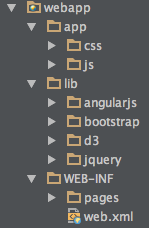
Let's give *.jsp pages access to the static resources and consider following project structure (Img.1.)
Img.1. - part of project structure with static resources
From the Img.1. comes the necessity to link the two folders ("/app", "/lib") which will by available for the front-end development after the application deployment. In such case we need to extend the implementation of the WebConfig class and configure callback methods to correctly customise Java-based configuration of the project. 

1. WebConfig extends WebMvcConfiguredAdapter which give us possibility to directly override necessary methods from WebMvcConfigurer. WebMvcConfigurer is normally imported by adding @EnableWebMvc annotation to @Configuration application class. The result it then delegated to WebMvcConfigurationSupport which provides Java-based config possibility. 
@Configuration
@ComponentScan("com.miko.s4netty")
@EnableWebMvc
public class WebConfig extends WebMvcConfigurerAdapter {
2. XML tag annotation for handling servlet requests <mvc:default-servlet-handler /> needs to be reflected in the WebConfig class by overriding  configureDefaultServletHandling method


...
@Override
public void configureDefaultServletHandling(DefaultServletHandlerConfigurer configurer) {
   configurer.enable();
}
...
3. Also resources request handling needs to be reflected by overriding appropriate method in the class WebConfig. This is normally done by XML tags <mvc:resources/> 


...
@Override
public void addResourceHandlers(ResourceHandlerRegistry registry) {
   registry.addResourceHandler("/app/**").addResourceLocations("/app/").setCachePeriod(31550522);
   registry.addResourceHandler("/lib/**").addResourceLocations("/lib/").setCachePeriod(31550522);
}
...
The last WebConfig class modification opens the possibility to continue building front-end application with appropriate resources. 
The final result of WebConfig class according to the front-end project structure (Img.1.) can looks like following example.
@Configuration
@ComponentScan("com.miko.s4netty")
@EnableWebMvc
public class WebConfig extends WebMvcConfigurerAdapter {
    @Override
    public void addResourceHandlers(ResourceHandlerRegistry registry) {
        registry.addResourceHandler("/app/**").addResourceLocations("/app/").setCachePeriod(31550522);
        registry.addResourceHandler("/lib/**").addResourceLocations("/lib/").setCachePeriod(31550522);
    }

    @Override
    public void configureDefaultServletHandling(DefaultServletHandlerConfigurer configurer) {
        configurer.enable();
    }

    @Bean
    public UrlBasedViewResolver setupViewResolver() {
        UrlBasedViewResolver resolver = new UrlBasedViewResolver();
        resolver.setPrefix("/WEB-INF/pages/");
        resolver.setSuffix(".jsp");
        resolver.setViewClass(JstlView.class);
        return resolver;
    }
}
Enjoy building rich front-end application!

Friday, June 27, 2014

Spring4Netty without Web.XML configuration on Java 8 (JBoss WildFly and Tomcat 8) - part.5:: Application Servers and logging

  
img.1.: official log


  This part about selected application start normally, just by downloading both of them and setting them up in your favorite IDE (img.2.) which is in my case IntelliJ IDEA (img.1.)


img.2.: Application Serves bond with IDE
   So here we go, app servers inside (like the intel processor). What it good to point out already at the beginning is the servlet-api versions support. 

Don't try to run this example project (GiTHub repository) on Tomcat 6.x. Why ? It's because Tomcat 6.x supports servlet-api ver. 2.5, and as you can find in the parent pom.xml file, the version 3.x of servlet-api is required. It's because of features we have touched earlier  (part.4.) .

   Almost every project uses some logging framework, in project case we use Simple Logging  Facade (SLF4j) together with well known Log4j. I don't want to write a lot about application logging design it's the another story (this project is just hot setup of usage). 
   What I want to touch here is the topic "How to enable logging under JBoss WildFly per deployment for SLF4j" 
   It 's because by the default installation of WildFly it not allowed. You see actually any Logger output in your SystemOut or log file.  

Let's edit in following way the ../standalone.xml file that you can find in the WildFly directory
   ...


            <!-- IMPORTANT LINE --> 


                ...


        ...
        
   ...
   
   ...
The logging is not fully setup but important details are there so you can enjoy my project. 
s4netty project GiTHub repository


ps: Also I've not merged JUnit, Mockito  tests in case I didn't want to touch this topic in this blogpost. 

Spring4Netty without Web.XML configuration on Java 8 (JBoss WildFly and Tomcat 8) - part.4:: Base - Spring MVC without Web.xml usage 2

  
img.1.: s4netty-web deployment result

  The base web module s4netty-web is almost similar to  the previous worker module (s4netty-worker) from the perspective of the Spring MVC configuration. 

  The main difference is the Servlet Context setup. In the usage 1 (s4netty-worker) everything was defined by appropriate annotations. In the usage 2 (s4netty-web) the Servlet Context is defined in traditional XML way from perspective of servlet definition. 
   ...


   ...
  The WebApplicationContext is instantiated by XmlWebApplicationContext which (img.2.) extends AbstractRefreshableWebApplicationContext. Here we go deeper to all WebApplicationContext implementations which are supposed to instantiate themselves  according to the provided configuration over the interface. 
img.2.: s4netty-web module structure 
  The purpose of  XmlWebApplicationContext  class is to load WebApplicationContext from the XML configuration files.  
public class WebInitializer implements WebApplicationInitializer {
    ...
    @Override
    public void onStartup(ServletContext servletContext) throws ServletException {
        ...
        XmlWebApplicationContext ctx = new XmlWebApplicationContext();
        ctx.setConfigLocation("WEB-INF/spring/dispatcher-servlet.xml");
        ctx.setServletContext(servletContext);
        ...

  What was also earlier only briefly touched (part1:: img.0.) is the ability of s4netty-web module to communicate with s4netty-worker  module utilising JSON serialisation/deserialisation over the service and pre-defined port P.

  The s4netty-web module uses instantiation of the RestTemplate which simplifies communication with HTTP server, its synchronous and it enforces RESTful principles, what is obvious from it name RestTemplate ;), but honestly it's pretty handy to use. 
@Controller
@RequestMapping("/")
public class MainController {
    ...
    RestTemplate restTemplate = new RestTemplate();

    @RequestMapping(method = RequestMethod.GET)
    public String printWelcome(ModelMap model) {
    ... 
  Let's ask s4netty-worker module for the car list using newly instantiated RestTemplate
    ...
   private List getSimpleCarList(){
        List result = new ArrayList<>();
        try{
            result = restTemplate.getForObject(S4_NETTY_WORKER_LINK, List.class);
            logger.debug("getSimpleCarList result= " + result);
        }catch (HttpClientErrorException e){
            logger.error("getSimpleCarList jsonCarList e= " + e);
        }
        return result;
   }
   ...

  Now we have ready two deployable war files and we can take a look at the result. But before we do so it's fair to mention why such configuration works.  The reason is that we do use for
 registering servlets in both cases  
   ...
   import javax.servlet.ServletRegistration.Dynamic
   ...

interface which uses one of addServlet()  methods into ServletContext. The interface is the part of javax.servlet-api imported previously by Maven into the project. 
  ...
  
        javax.servlet
        javax.servlet-api
        3.0.1
        provided
  
  ...
After this final hit we do know all and we can start with deployment on application servers (JBoss WildFly & Tomcat 8 were selected).
Let's make it in the Next part (Click Next) 

s4netty project GiTHub repository